Fifty-two weeks of paperwork, or why I mailed my KPIs to a bash script
My bureaucracy does not wake up thinking about pg_dump throughput. Totally fair.
What it does seem to wake up thinking about—once every seven days—is: “Please prove you did operational work this week.” In Indonesia’s public-sector world that often means Sasaran Kinerja Pegawai (SKP)—roughly employee performance targets with evidence that has to arrive on a schedule whether or not Prometheus feels chatty.
So there I was with a cheerful little math problem: one report per week → fifty-two installments of the same chore. The content isn’t Nobel-level prose. It’s backups ran, uploads finished, timestamps exist. Which made the whole thing feel less like diligence and more like CTRL+C, CTRL+V Season 2: The Revenge of the Calendar.
Enough. Maybe the receipts could assemble themselves—or at least show up dressed for court.
It’s not laziness; it’s déjà vu
Manual weekly reports steal time because you have to reconstruct memory across dashboards, chats, half-remembered “did we run cron last Tuesday?” vibes, then paste sizes and timings into whatever Word-shaped gatekeeper your office uses.
Automation here isn’t a moral shortcut. It’s an audit trail with personality—one line of truth every run, stamped by the machine instead of reconstructed by sleepy human RAM.
If you already have cron or a systemd timer humming on a backup host, congratulations: the calendar is outsourced. Now you teach the scripts to gossip in structured English (or JSON) about:
- Timestamps and job labels
- Archive size and duration
- Upload speed when you can cheaply measure it
- Bonus: object
lastModifiedfrom your S3-compatible bucket so cloud agrees with earth
That’s basically a KPI paragraph waiting to hatch.
flowchart LR
  cron[cron/timer] --> script[Backup scripts]
  script --> log[Structured logs]
  log --> ssh[SSH / copy artifacts]
  ssh --> gen[Generate DOCX]
  gen --> skp[Weekly evidence pack]
Your scripts already want to brag—you just have to mic them up
Two patterns showed up on my servers: compress, mc cp, prune old copies. Cute. Predictable.
Web bundle archive (your backup-www-archive.sh or whatever you quietly call it): you’re already computing GiB, duration, average MiB/s—that’s respectable evidence that something finished with numbers attached. Sprinkle in one append-only log line (key=value or single-line JSON) so you aren’t hostage to ephemeral echo scrollback forever. An ISO-week filename like yourprefix-YYYY-Www.tar.gz is also a cheat code for aligning with SKP weeks.
Database dump (your backup-db-remote.sh or equivalent): tension lives in pg_dump | gzip before upload even gets its coffee. Wrap that block in the same nano-second timestamps you used for uploads, split dump time vs upload time, then reuse mc ls --json—you probably already jq-sort that for retention anyway—to snag lastModified for “when the bucket believed the artifact existed.” Mash filename, bytes, per-stage durations, and timestamps into one postcard per execution.
Suddenly Monday-you isn’t archaeology. Monday-you is opening a spreadsheet that already drank its coffee.
Snippets — just the backbone (no full scripts, because my billing model doesn’t cover security audits for free!)
If you want the punchlines, please pay me. If you want the entire stand-up routine (a.k.a. actual shell scripts with hostnames and buckets), I accept cash, snacks, or proof you survived an Indonesian payroll export. Meanwhile, here are the safe, anonymized bits:
What actually runs lives in private cron scripts outside this page (backup-db-remote.sh-shaped helpers, web ISO-week tarball jobs)—both follow compress / mc cp / prune. Secrets ship via EnvironmentFile, never inline posts.
backupFormalReportDocx.js still reads plain job log output (your configured patterns inside FILE_TOKEN_RE—typically *.sql.gz plus ISO-week *.tar.gz naming)—optional JSON Lines is extra audit sugar, not what that generator eats today.
DB lane — stamped dump name, containerized pg_dump | gzip, mc cp, terse success echo:
DATE="$(date +%F_%H-%M)"; FILENAME="${DB_DUMP_PREFIX:?}_${DATE}.sql.gz"
docker run --rm … "${PGDUMP_IMAGE:?postgres-major-alpine}" sh -lc \
  'pg_dump -h … -p … -U … --format=plain --no-owner --no-privileges … | gzip -9' \
  >"$TMPFILE"
mc cp "$TMPFILE" "$DEST"
echo "✅ Backup OK → s3://…/$FILENAME (keep ${KEEP:-7})"
Web lane — ISO-week tarball, archive parent/dir from env-only paths, timed upload echo:
WEEK="$(date +%G-W%V)"; FILENAME="${WWW_WEEK_PREFIX:?}-${WEEK}.tar.gz"
tar -C "$WEB_PARENT" -czf "$LOCAL_FILE" "$WWW_DIRNAME"
T0=$(date +%s.%N); mc cp "$LOCAL_FILE" "$DEST"; T1=$(date +%s.%N)
echo "[www-backup] … durasi … dtk · kecepatan … MiB/s"
Optional crumbs — lastModified from the same mc ls --json you already prune with; peek JSONL if you dual-write:
LAST_MOD="$(mc ls --json "${ALIAS}/${BUCKET}/${PREFIX}/" \
  | jq -r --arg key "$FILENAME" 'select(.type=="file" and .key==$key) | .lastModified' \
  | head -n1)"
tail -n 5 /var/log/backup-events.jsonl 2>/dev/null | jq . || true
That’s enough structure to SSH-scrape a week slice, then let backupFormalReportDocx.js (or whoever you script next) plead your case inside a .docx.
SSH isn’t the only narrator
Prefer journald? Teach your unit StandardOutput=journal like a backstage pass. Prefer files? Cron can >> /var/log/backup.log 2>&1 and pretend it invented observability.
SSH is just the limousine that shuttles compressed evidence to whichever laptop runs docx generation. If you trust the bucket more than corp VPN, tiny metadata stubs (never secrets) beside the tarball work too—as long as you’re not streaming passwords into KPI PDFs like a chaotic villain director’s cut.
From angry logs to fancy Word (backupFormalReportDocx.js)
Somewhere in my repo sits backupFormalReportDocx.js—Node, docx, moment with Indonesian locale—that slurps a big log blob, scopes lines to ISO week ranges, builds tables for DB and web rows, recognises filenames you define (FILE_TOKEN_RE in that script matches *.sql.gz variants and whatever ISO-week tarball mask lives in your private codebase), and prints paragraphs polite enough that a formal cover page doesn’t look like a meme.
Whatever your template bureaucracy demands, you’re basically vending a respectable box—a cover block, typography that doesn’t apologize, filenames that whisper “I read the memo.” The UI hangs it together the boring way—ISO year, running number for the formal month code, ISO week picker in WIB, filename preview mirrored off that math—then Unduh laporan (.docx).
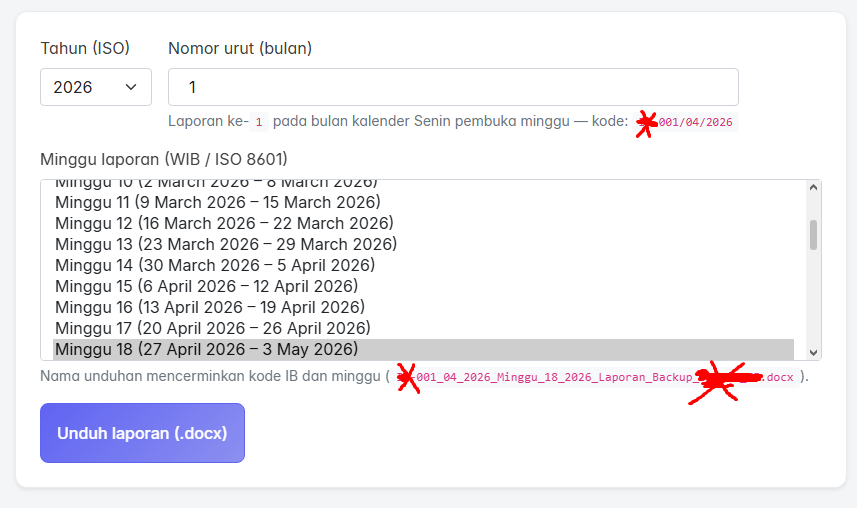
Operational recipe:
- One append-only log sink fed by web + DB jobs.
- Filter for the same ISO week tag SKP insists on this week (yes, bureaucracy and ISO agree sometimes—it’s spooky).
- Emit one
.docxper week. You keep the human garnish—sign-offs, anecdotes about incidents spreadsheets can’t confess—in two handwritten sentences instead of retyping seventy metrics from scratch.
Inside the document, proof isn’t vibes—it’s the table work: durations, throughput, tarball names lined up beside ISO week anchors. You also inherit the ceremonial pages—titles, periodic headers, Pengesahan dokumen, signature scaffolding—everything that convinces auditors you bothered with layout before you reached the nerd tables.
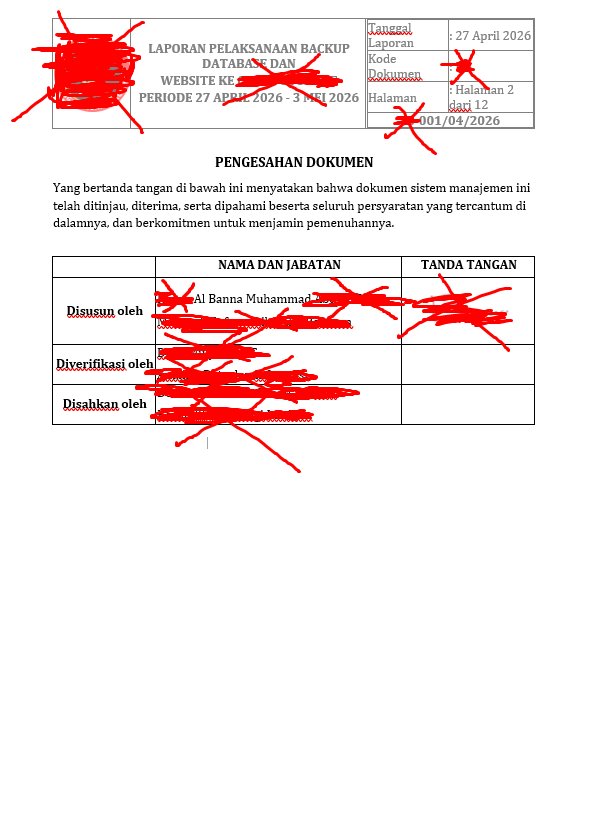
Documentation doesn’t evaporate; the grunt work mostly does.
Honest finale
Automate KPI evidence when goals map to measurable pipes—backup cadence, object freshness, sane sizes.
If reviewers ask for narratives only humans own (which outage, whose decision, feelings about Tuesday), leave blank callout paragraphs in your template generator. Still cheaper than forging fifty-two artisanal KPI novellas while your bash scripts glare from htop, wondering why they didn’t co-author.
Next step that actually earns coffee: unify both jobs on one newline JSON schema, run one miserable dry week through your existing DOCX funnel, tweak fonts until compliance smiles, celebrate with an unhealthy pastry.